25 Essential Graphic Design Tips from Creative Directors
Most small business designs are dreadful.
It’s not just “a bit off.” It’s actively sabotaging otherwise excellent businesses. It screams ‘amateur’ from a mile away, undermines trust, and confuses customers before they understand what you do.
The real problem isn’t a lack of expensive software. It’s a lack of rules. It’s aesthetic anarchy. You add a bit here, tweak a bit there, and you’re left with a visual mess that doesn’t say anything coherent.
This isn’t about becoming a creative director overnight. This is about giving you a brutally honest set of graphic design tips—a filter. Follow them, and you’ll stop wasting time and money on design that doesn’t work.
- Graphic design communicates a message; clarity is vital for effective design and customer understanding.
- Design should prioritise customer needs over personal taste to build trust with target audiences.
- A solid strategy is the foundation of design, translating business goals into visual representation.
- Brand guidelines ensure consistent application of visuals, eliminating confusion in brand identity.
- Avoid design trends; focus on timeless principles for enduring design effectiveness.
Part 1: The Strategic Stuff You’re Probably Skipping (Tips 1-5)
This is the boring part. It’s the part everyone skips to get to the colours and fonts. It’s also the single biggest reason most designs fail.
1. Stop Decorating, Start Communicating
Graphic design is not art. It’s not about making things pretty.
It is about clarity. Its job is communicating a specific message to a person to achieve a particular outcome. If your design, no matter how beautiful, doesn’t make your message more straightforward, it has failed. Full stop.
Before you choose a single colour, ask: What am I trying to say? Who am I saying it to? And what do I want them to do?
2. Design for Your Customer, Not Your Mum
Your taste is irrelevant. The opinion of your spouse, best mate, or mum is also irrelevant.
Unless they are your ideal customer. Which they probably aren’t.
Who pays your invoices? A 55-year-old corporate facilities manager? A 22-year-old fashion student? Their visual language, expectations, and what they consider ‘trustworthy’ are worlds apart. Design for them. End of story.
3. Strategy First. Always.
Running a business without a strategy is just a hobby. The same goes for your visual identity. A design without a plan is just a picture.
Your brand strategy defines your position in the market, values, personality, and promise to the customer. Your design is the visual translation of that strategy. Without the strategy, you’re just guessing with colours and shapes.
4. A Mood Board Isn’t a Luxury, It’s a Map

Don’t just collect things you ‘like’. A mood board is a strategic tool. It’s where you define the feeling of your brand before you start building the assets.
Gather images, colours, textures, and typography reflecting your strategic direction. Look for patterns. Does it feel modern or traditional? Bold or reserved? This becomes the visual compass for everything you design from this point forward.
5. Steal Like an Artist (The Right Way)
Nobody creates in a vacuum. The problem is, most people steal badly. They copy the surface-level aesthetics without understanding the thinking behind them.
Don’t just look at another brand’s logo. Analyse it. Why did they use that typeface? How does their colour choice reflect their market position? Deconstruct why it works. Steal the thinking, the principles, the strategy—not the final execution.
Part 2: The Foundational Rules That Separate Pros from Amateurs (Tips 6-13)
Get these basics right and you’re already in the top 10%. They are the non-negotiables.
6. Master Visual Hierarchy
Hierarchy is how you guide the viewer’s eye. It tells them what’s most important, what’s second, and what’s third. Without it, you’re just shouting everything at once, and the result is that nothing is heard.
Use size, colour, contrast, and placement to create a clear path. The most crucial element (your headline, your call-to-action) should be the most visually dominant. It’s that simple.
7. Give Your Content Room to Breathe (Use White Space)
People are terrified of empty space. They think it’s wasted. It’s not. It’s one of the most powerful tools you have.
White space (or negative space) reduces clutter and increases comprehension. It gives focus to your essential elements. Doubling the white space around a text or logo block can dramatically increase its impact.
It’s a sign of confidence. It says, “What I have to say is so important, it doesn’t need to be crowded by noise.”
8. The 60-30-10 Rule for Colour

Stop picking colours at random. A simple, professional colour palette doesn’t need more than three colours.
Use the 60-30-10 rule as a starting point:
- 60% is your dominant, primary colour.
- 30% is your secondary colour, used to create contrast.
- 10% is your accent colour, for the things you want to stand out, like a call-to-action button.
This creates balance and stops your design from looking like a children’s party.
9. Two Fonts. Max.
You don’t need five different fonts on your website. It doesn’t make you look creative; it makes you look chaotic.
Pick two: a primary font for headlines (something with personality) and a secondary font for body text (something straightforward to read). Make sure they complement each other. That’s it. That’s your typographic system. Job done.
10. Learn What Kerning Is (and Why It Matters)
Kerning is the space between individual letters. Most people have never heard of it, which is why so many DIY logos and headlines look subtly ‘off’.
Bad kerning creates awkward gaps or smushed-together letters that disrupt the reading flow. Professional design software gives you control over this. Even if you’re just typing a headline, take 30 seconds to look at the spacing. Does it feel even? Fixing it is a small detail that makes a huge difference.
11. Stick to a Grid. It’s Not a Cage, It’s a Skeleton
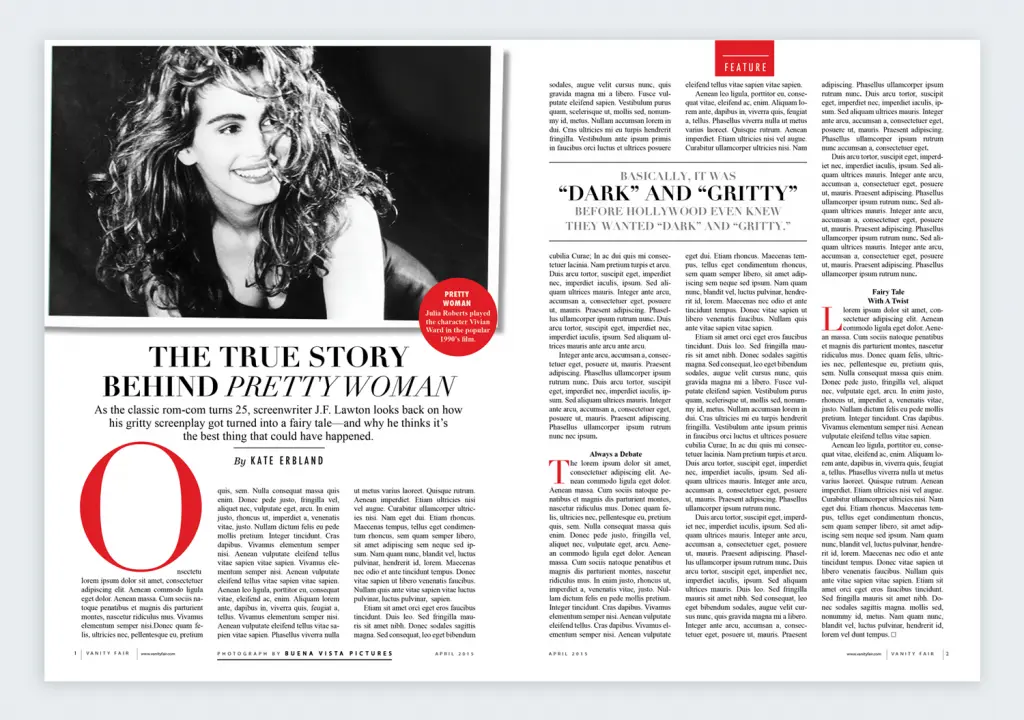
A grid is an invisible structure of columns and lines that helps you align elements consistently. It’s the foundation of almost every well-designed website, poster, and document.
Using a grid doesn’t restrict creativity. It enforces order. It ensures that your logo, text, and images have a relationship with each other on the page. It’s the single fastest way to make a layout look intentional and professional instead of like you just threw things at a canvas.
12. Prioritise Readability Above All Else
That stylish, ultra-thin font might look great in isolation, but can someone read three paragraphs? Can they read it on a mobile phone in bright sunlight?
For body copy, readability trumps personality every time. Use a reasonable font size (16px is a good starting point for web). Ensure high contrast between your text and the background (light grey text on a slightly less light grey background is a classic amateur move). If people can’t read your message, you don’t have one.
13. Understand Vector vs. Raster (or Pay the Price)
This is a technical point, but it will save you immense pain.
- Raster images (like JPEGs, PNGs) are made of pixels. They are fine for photos. But they become a blurry, pixelated mess if you try to make them bigger.
- Vector images (like SVGs, AI, EPS files) are made of mathematical paths. You can scale them to the size of a postage stamp or a building, and they will remain perfectly sharp.
Your logo and any core brand icons must be in vector format. No exceptions. If a designer ever tries to deliver your final logo as just a JPG or PNG, they are not a professional.
Part 3: Common Traps and Amateur Hour Mistakes (Tips 14-20)
If Part 2 was about what to do, this is about what to stop doing. Immediately.
14. Your Logo is Not Your Brand
Obsessing over the logo for six months while your website looks like a hostage note from 1998 is a classic case of misplaced priorities.
A logo is a signature. It’s a simple identifier. Your brand is the entire system: the colours, the typography, the photography style, the tone of voice, the customer experience. The logo is just one small (dare I say) overrated part of that system.
15. Drop the Cheesy Stock Photos
You know the ones. The pleased, multi-ethnic team is pointing at a whiteboard. The woman laughing alone with a salad.
This generic stock photography is worse than having no image at all. It’s a visual filler that communicates nothing authentic about your business. It tells the world you’d rather use a cliché than show who you are. Invest in a few decent photos of your actual team, your actual product, or your actual office. It’s worth it.
16. Stop Making Everything Symmetrical
The temptation for a non-designer is to centre everything. The logo, the headline, the text, the image. It feels ‘safe’.
It’s also dull. Asymmetry is what creates visual interest and dynamism. Placing key elements off-centre creates tension and a more sophisticated layout. Look back at the grid (Tip #11). Use it to make a balanced, asymmetrical layout.
17. ‘Make it Pop’ Is Not Creative Direction

This is my biggest pet peeve. Vague, subjective feedback like “make it pop,” “give it more wow factor,” or “it just doesn’t feel right” is utterly useless.
If I had a pound for every time that phrase appeared in a creative brief, my CV would be a single line that reads: ‘Retired’.
Feedback needs to be tied to the strategy. Instead of “I don’t like the colour green,” try “Our strategy is to appear trustworthy and established; does this bright, neon green support that, or should we explore a more traditional, darker green?” One is an opinion; the other is a strategic conversation.
18. Acknowledge the Canva in the Room
Let’s be clear. Canva is a fantastic tool for creating a quick social media graphic or a presentation slide.
It is not a tool for creating a durable, unique brand identity.
My issue isn’t with the software; it’s with the mindset. When you build your core identity from a template, you’re building on borrowed ground. Your logo looks like a thousand other businesses. Your brand has no unique DNA. Use it for day-to-day tasks, by all means. But for your cornerstone assets, you need something unique.
19. Trends Are Where Good Ideas Go to Die
Gradients are in. Then they’re out. Then brutalism is in. Then serifs are back.
Chasing design trends is a fool’s errand. When you’ve redesigned your site to match the current fad, the industry has moved on, and you just look dated. Great design is timeless. Focus on the principles—hierarchy, typography, and space. They don’t go out of style.
20. Don’t Outsource Your Thinking to AI
AI image generators are powerful. They can also produce generic, soulless nonsense devoid of any real strategy.
Use AI as a brainstorming partner—a tool for rapid visualisation. But don’t let it make the final call. Strategic thinking, understanding your customer, and the final touch of human intention are still part of your job. An AI can’t have a ‘pet peeve’ or a firmly held belief. Its output lacks a point of view.
Part 4: The Path to Consistency and Growth (Tips 21-25)
This is how you turn a collection of good designs into a coherent and valuable brand.
21. Create and Worship Your Brand Guidelines

A brand guide is the rulebook for your visual identity. It dictates exactly how your logo should be used, your brand colours (with specific hex codes), which fonts to use, and your photography style.
This document is the most important thing for ensuring consistency, especially as your team grows or you work with freelancers. It eliminates guesswork and puts an end to aesthetic anarchy.
22. Test Everything (That You Can)
Design in a business context isn’t about what you think works best. It’s about what works best.
You don’t need a massive budget for this. You can A/B test a headline on a landing page. You can run two social media ads with different images to see which gets more clicks. Use data, however small, to inform your decisions. It turns design from an art project into a business tool.
23. Design for Screens First
Most people will experience your brand on a screen. A mobile phone screen.
Yet many businesses still design a print brochure first or review their new website on a giant desktop monitor. Start with the smallest screen. If your message is clear and your design works on a mobile, it will work anywhere. This mobile-first approach forces you to be ruthless about prioritising what matters.
24. Think in Systems, Not Singles
Don’t design a business card. Design a business card belonging to the same family as your website, social media templates, email signature, and packaging.
No matter how small, every piece is part of a larger system. They should all feel like they came from the same place and speak with the same voice. This consistency is what builds brand recognition and trust over time.
25. Know When to Hire a Professional
You should use these tips to improve your design eye and basic materials. But there comes a point where DIY becomes a false economy.
If you’re launching a serious business, rebranding, or feeling you’ve hit the ceiling of your ability, it’s time to invest in a professional. A good designer isn’t just a pair of hands; they’re a strategic partner who will force you to answer the hard questions from Part 1 and build a system that works.
That’s the point where you stop tinkering and start building a real, valuable asset. If you’re at that point, you know what to do. The investment pays for itself in clarity, credibility, and time you get back actually to run your business.
Conclusion
There you have it. Twenty-five points. It boils down to this: Clarity over clutter. Strategy over aesthetics. Consistency over trends.
Good design isn’t magic. It’s a series of deliberate, informed choices. Stop throwing things at the wall to see what sticks. Start making those choices. You’ll be ahead of 90% of your competition before opening a piece of software.
Need to Get it Right the First Time?
If going through all of that sounds like a full-time job, that’s because it is. We’re here when you’re ready to stop being a part-time designer and focus on your business. Check out our graphic design services, or if you’re prepared to talk about specifics, request a quote. We handle the design strategy so you can handle the business.
Frequently Asked Questions (FAQs)
Do I need a professional logo? Can’t I just use a logo maker?
You can, but it’s short-sighted. A logo maker gives you a generic icon. A professional designer gives you a unique, strategic asset that’s legally ownable and built to last. It’s the difference between buying a suit off the rack and getting one tailored.
How much should I budget for graphic design?
It varies wildly. A simple logo from a freelancer could be a few hundred pounds, while a complete brand identity from an agency could be tens of thousands. The important thing is to see it as an investment. A cheap design that doesn’t work is 100% wasted money.
What’s the single biggest mistake small businesses make with design?
Inconsistency. Using one logo on the website, a different one on social media, random colours in presentations, and a mix of ten fonts across all communications. It creates a chaotic, untrustworthy impression.
How many colours should be in my brand’s colour palette?
Start with one or two primary colours and one accent colour. You can always add more neutral shades (like light grey, dark grey, off-white) for backgrounds and text. Simpler is almost always better.
What’s more important: the logo or the website?
The website. It’s where you have the most space to communicate your value, build trust, and convert customers. A great website with an average logo will consistently outperform a terrible one with a world-class logo.
What is a brand style guide, and do I need one?
Yes, you need one. It’s a document that sets the rules for your brand’s looks and feels—your logos, colours, fonts, etc. It’s the key to keeping your brand consistent, especially as you grow.
Should I use serif or sans-serif fonts?
There’s no correct answer; it depends on your brand’s personality. Traditionally, serif fonts (with the little “feet”) feel more classic and established, while sans-serif fonts feel more modern and clean. The key is to pick one of each that works well together.
How do I give good feedback to a designer?
Be specific and tie your feedback to the project goals, not your taste. Instead of “I don’t like it,” say “Our goal is to appear more approachable. This design feels a bit too corporate and cold. Can we try a warmer colour or a friendlier font?”
Where can I find good, non-cheesy stock photos?
Sites like Unsplash, Pexels, and Kaboompics offer more natural, authentic-looking free stock photos. For paid options, Adobe Stock and Stocksy United are known for higher-quality, curated collections.
What’s the difference between a graphic designer and a brand strategist?
A graphic designer executes the visual work. A brand strategist defines the high-level plan: who you are, who you’re talking to, and what you want to say. Some designers are also strategists, but they are in different disciplines. You need the strategy before you need the design.
Is white space really that important? It feels like wasted space.
It’s arguably one of the most essential elements. It’s not wasted space; it’s breathing room. It guides the eye, improves comprehension, and makes your design look more sophisticated and confident.
My designer sent me my logo as a PNG. Is that okay?
It’s okay for web use (like on your website), but insufficient. You must also have the original, editable vector file (usually an .AI, .EPS, or .SVG file). This is the master file that can be scaled to any size without losing quality.


