How to Choose the Best Web Hosting Plan for Your Business
Whether running a small e-commerce store, a bustling blog, or a sleek corporate site, your choice of web hosting can make or break your online success.
But with a dizzying array of options and confusing jargon, how do you pick the right plan without getting ripped off or overwhelmed?
In this article, we’re stripping away the fluff and getting to the heart of what matters when choosing a web hosting plan.
We’ll walk you through the key factors to consider, common traps to avoid, and how to match the perfect hosting plan to your business goals.
By the end, you’ll be confident to make an informed decision that sets your website up for speed, security, and scalability.
Let’s dive in and demystify the world of web hosting—no tech degree required.
- Understand your business needs first—traffic, storage, scalability determine whether shared, VPS, cloud, or dedicated hosting fits best.
- Prioritise performance, reliability, and security—NVMe storage, 99.9%+ uptime, SSL, backups, WAF and DDoS protection.
- Choose support and manageability matching your skills—managed plans for non-technical users, unmanaged or dedicated for advanced control.
Importance of Choosing the Right Web Hosting Plan

Selecting the right web hosting plan isn’t just about cost. It’s about ensuring your website is fast, reliable, and secure. Here’s why it matters:
- Performance Matters: A slow website drives visitors away. If your site takes ages to load, you may lose potential clients faster than a cold cup of coffee.
- Reliability and Uptime: You want a service that won’t leave you stranded during crucial business hours. An unreliable host means your site could go down when your audience needs it most. It’s like opening a shop and forgetting to unlock the door.
- Scalability and Growth: If your website takes off (which we all hope for), you’ll need a hosting plan that grows with you. There’s nothing worse than your success hitting a wall because of hosting limitations.
- Support System: Technical issues can arise at the worst moments. A responsive customer support team can differentiate between a minor hiccup and a full-blown disaster.
Choosing the wrong plan? Well, imagine putting all your effort into launching a fancy storefront and then realising you can’t keep the lights on or, worse, no one can get in to shop!
Types of Web Hosting Plans
Now that we’ve established why the right plan is crucial, let’s explore the different types of web hosting plans. Each plan comes with its own set of features, pros, and cons. Here’s a rundown:
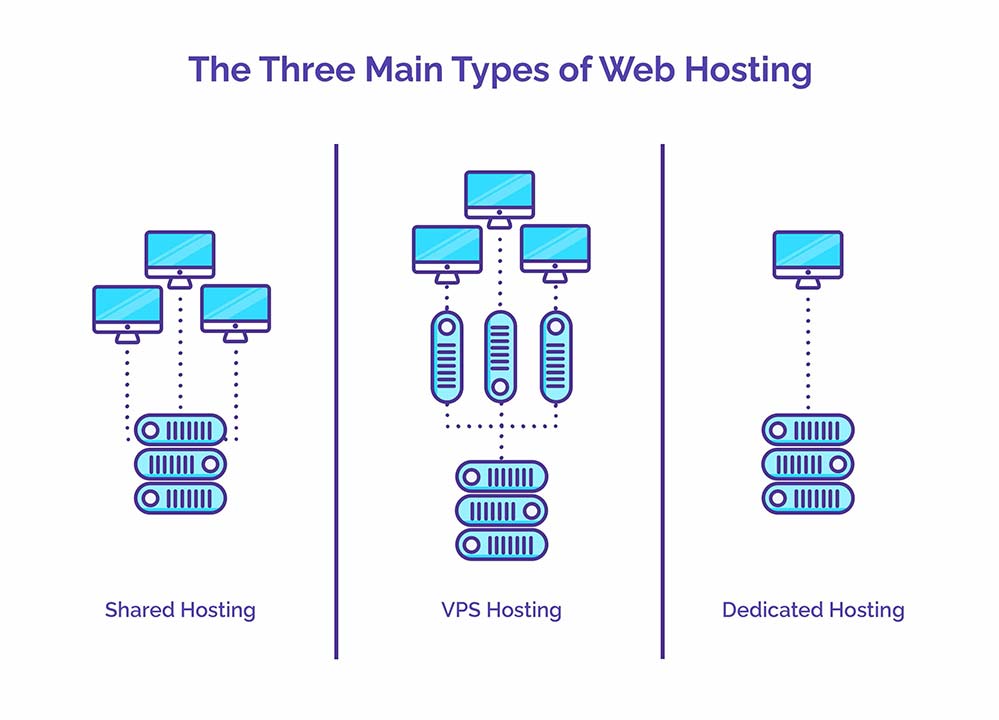
- Shared Hosting:
- Perfect for beginners and small businesses.
- Economical: all users share the same server resources.
- Pros: Affordable, easy to set up.
- Cons: Slower speeds and potential downtime due to other sites on the same server.
- Ideal for Personal blogs or small business sites.
- VPS Hosting (Virtual Private Server):
- A middle ground between shared and dedicated hosting.
- You share a server with others but have dedicated resources.
- Pros: Better performance, more control and customisation.
- Cons: More expensive, requires some technical know-how.
- It is ideal for growing businesses and websites that need more power.
One more thing on VPS, and it’s a big one. You’ll see “Managed” and “Unmanaged” plans knocking about.
Managed VPS is like having the hosting company as your personal tech crew. They handle all the technical details in the background, such as security updates and software patching.
Essentially, they ensure the server is running smoothly. If you’re not a server expert, this is the one you want. No question.
An unmanaged VPS is the complete opposite. It’s the DIY option. They give you the server and the keys, and then they’re off.
You’re responsible for everything. All of it. It’s cheaper, sure, but if you don’t know what you’re doing, you’re setting yourself up for a world of pain. I’m talking late nights and a lot of frantic Googling.
- Dedicated Hosting:
- You get an entire server to yourself.
- Pros: High performance, complete control, tailored resources.
- Cons: The most expensive option requires technical expertise.
- Ideal for: Large businesses or high-traffic websites.
- Cloud Hosting:
- Multiple servers work together to host your site.
- Pros: Scalability, flexibility, high uptime.
- Cons: Can be complex to manage and have variable pricing.
- Ideal for: Websites with fluctuating traffic demands.
- Managed WordPress Hosting:
- Specifically designed for WordPress sites.
- Pros: Optimised performance, automatic updates, enhanced security.
- Cons: More costly than shared hosting, limited to WordPress.
- Ideal for WordPress users seeking a hassle-free experience.
- Reseller Hosting:
- Fancy becoming your own little hosting company? This is how you do it.
- You buy a chunk of server space and then sell it on to your own clients.
- Pros: A good way to earn some recurring income. You can bundle it with your web design services to offer a complete package.
- Cons: Here’s the kicker. You become the customer support. When your client’s site goes down at midnight, they’re calling you, not the main hosting company. You also have to handle all the billing and administration.
- Ideal for: Web design agencies or developers who look after a portfolio of client sites and want to streamline everything under one roof.
The 2026 Performance Standard: NVMe Storage
In 2026, the engine under the bonnet of your server matters more than ever for Core Web Vitals.
While traditional SSDs were once the gold standard, NVMe (Non-Volatile Memory Express) storage is now the baseline for business-class hosting.
NVMe drives offer up to 10x higher throughput and significantly lower latency compared to standard SATA SSDs. This directly impacts your TTFB (Time to First Byte), a critical signal for Google’s AI Overviews.
If your host isn’t offering NVMe Gen 4 or 5, your e-commerce site will struggle to keep up with the rapid data retrieval required by modern Generative Engines.
Remember, every business has unique needs. A blog might thrive on shared hosting, while a burgeoning e-commerce site could need the robustness of dedicated hosting. Consider your specific requirements and budget when evaluating your options.
Comparison Table: 2026 Hosting Hardware Benchmarks
| Feature | Shared (Standard) | Managed VPS | Cloud Hosting |
| Storage Type | SATA SSD | NVMe Gen 4 | Distributed NVMe |
| Typical Uptime | 99.9% | 99.95% | 99.99% |
| AI Scaling | None | Manual | Predictive / Auto |
| Security | Basic Firewall | WAF + Root Access | Enterprise Grade |
Your web host is the backbone of your business. Ensure it’s strong enough to support everything you plan to accomplish.
Assessing Your Business Needs
Now that we’ve covered the foundational aspects of web hosting plans, it’s time to get honest about your business needs. You can’t just pick a hosting plan out of a hat, hoping it’ll work.
You need to assess your requirements carefully—let’s explore how to do that.

Determining Website Traffic and Bandwidth Requirements
First things first: traffic. How many people do you expect will visit your website? Is it just a few curious friends or a flood of potential clients? Knowing the average expected visitors is essential for selecting the right hosting plan.
Here are a few questions to consider:
- What’s the nature of your website?
- A simple blog will have different traffic needs than an e-commerce store with a vast array of products.
- Do you anticipate sudden traffic spikes?
- Seasonal sales or promotional campaigns can cause temporary spikes in demand. You could have many frustrated visitors if your website can’t handle them.
Bandwidth is another vital consideration. This term refers to the data your hosting server can transfer quickly. Your website may slow down or crash if your traffic exceeds your bandwidth.
To assess your traffic and bandwidth, consider these tips:
- Utilise tools like Google Analytics to gain an initial understanding of your expected visitors.
- Examine similar websites in your niche to assess their traffic levels.
- Don’t guess—research is your best friend here!
Considering Storage and Scalability
Next, let’s discuss storage and scalability. These are crucial for long-term success, not just the initial setup. Consider how much data you’ll need to store and how easily you can upgrade your storage later.
Here’s what to think about:
- Website Type: Have many images, video content, or downloadable files? If you’re running an e-commerce site, product images will quickly take up space.
- Initial Content and Growth Plans: Consider your existing content and projected growth. Starting with a few blog posts? Great, but will you naturally grow to hundreds over the course of a year?
- Scalability: You want a hosting plan that allows easy upgrades. Think of it like a gym membership—you don’t want to be locked into a plan where you can’t even add a few extra workout sessions when the mood strikes!
Here’s a handy checklist:
- Assess Current Needs: Estimate storage based on your launch content.
- Project Future Needs: How do you envision your website evolving?
- Flexible Hosting Options: Look for plans for easy upgrades or additional storage.
You might think, “But can’t I change my hosting plan later?” You can switch, but it can be a hassle—consider the challenges of migrating data, downtime, and potential confusion.
I’ve had to migrate servers before, and trust me, it took longer than expected. Choosing a host that can grow with you from the start? That’s a solid move.
Be Honest About Your Tech Skills
Right, let’s have a frank chat. How comfortable are you with the technical side of things?
Because your answer should really shape what kind of plan you go for. It’s no good buying a Formula 1 car if you’ve only just passed your driving test. You’ll spend more time in the garage than on the road.
Being honest with yourself here will save you a massive amount of stress down the line. Let’s break it down:
- Beginner Level: If words like “SSH” or “database” make you feel a bit queasy, that’s completely fine. Most people are in this boat. Stick with Shared Hosting or Managed WordPress Hosting. They’re built for you. You’ll get a simple control panel, someone else worries about security, and the host handles all the heavy lifting behind the scenes. Your job is just to add content to your site. Zero stress.
- Intermediate Level: Maybe you’ve run a WordPress site for a while. You know your way around a plugin or two, you’re not afraid to peek at a bit of code, and you’re happy to get your hands a little dirty. A Managed VPS is probably your sweet spot. You get more power and control than with shared hosting, which is great for a growing site, but you’re not left alone with all the intimidating server administration tasks. It’s the best of both worlds.
- Advanced Level: If you live and breathe this stuff, maybe you’re a developer or a systems admin, then you’ll want the freedom to do what you want. An Unmanaged VPS or even a full Dedicated Server is your playground. You get “root access,” which means you’re the king of the castle. You can install whatever you like and configure it to your heart’s content. However, remember that with great power comes great responsibility. You break it, you fix it. This path is not for the faint of heart.
Key Features to Look for in a Web Hosting Plan
We’ve discussed assessing your business needs, but now it’s time to get into the nitty-gritty. These key features can significantly impact your web hosting experience.
You want to ensure that you’re not just choosing a plan but one that truly supports your goals. Let’s dive into the essentials you should be on the lookout for.

Reliability and Uptime Guarantee
Let’s start with reliability. You wouldn’t want to invest time and money into a website that crashes as often as a clumsy toddler trips over their own feet.
Look for hosting providers that offer a minimum uptime guarantee of 99.9%. This statistic indicates how your website is typically operational. A host that can’t uphold this promise is like a cafe that claims to serve coffee but constantly runs out!
Consider this: if your website is down, your customers won’t be able to access your services. This could lead to missed sales opportunities and a loss of trust.
In my early days at Inkbot Design, I chose an unreliable host because they advertised low prices. It sounded like a deal until their server crashed during a big launch—and I lost potential clients. Ouch!
To evaluate reliability, consider these factors:
- Check reviews: Customer feedback can reveal patterns in downtime or reliability.
- Inquire about server locations: A host with multiple servers worldwide may provide a more consistent experience.
- Look for SLAs (Service Level Agreements): These documents outline uptime commitments and penalties for unmet expectations.
Security Measures
Next on the list? Security measures—a must-have in today’s digital landscape. Websites are prime targets for hackers, which makes safeguarding your data essential.
Here’s what to watch for:
- SSL Certificates: This encrypts data exchanged between your site and visitors. It’s like locking the front door of your shop—necessary for keeping your valuables safe. Additionally, Google prioritises secure sites in its search engine rankings.
- Regular Backups: Ensure your host provides automated backups. If something goes wrong, you want a safety net—a server issue or a human error.
- DDoS Protection: Protecting against Distributed Denial of Service (DDoS) attacks helps keep your site operational even during an attack.
- Firewall Protection: An additional layer of security that prevents malicious traffic from accessing your site.
- Automated Malware Scanning: Many reputable hosts now have systems that continuously scan your site for malicious code. It’s like having a security guard patrolling your shop 24/7, looking for anything out of place. This is a massive help because it can catch problems before your site gets blacklisted by Google or starts infecting your visitors.
- Web Application Firewall (WAF): This may sound complicated, but it’s actually quite simple. A WAF is a special filter that sits in front of your website and blocks common hacking attempts. Think of it as a bouncer at a club who knows all the tricks. It stops things like SQL injections and cross-site scripting before they can even get near your site’s data. A decent WAF is a seriously good layer of protection to have.
I once experienced a data breach with a less secure hosting provider. It was a nightmare! I had no backups and lost significant data, which took weeks to recover. A good security framework is worth every penny to avoid potential crises.
Customer Support Options
Last but certainly not least, there are customer support options. When something goes wrong (and let’s be honest, it will at some point), you want a responsive support team to help you through the chaos.
Here are the aspects to consider:
- 24/7 Availability: Issues don’t occur during office hours. Ensure there’s support around the clock.
- Multiple Channels: The more ways to contact support, the better! Phone, email, live chat, and support tickets are all options.
- Knowledge Base and Resources: A robust library of FAQs, tutorials, and forums demonstrates that a host is invested in helping you resolve your concerns proactively.
- Reputation for Good Support: Don’t hesitate to check reviews. Great support can turn a frustrating day into a mere inconvenience.
When I started, I had a fantastic hosting provider offering only email support during business hours. When I faced an urgent technical issue at 11 PM, it felt like I was clambering up a cliff with no rope. Don’t make the same mistake!
What About the Control Panel?
The control panel is your mission control. It’s the dashboard where you’ll manage everything for your site, except for the site itself.
Consider setting up your professional email addresses, installing WordPress with a single click, or managing your files. Its ease of use is a bigger deal than you might think.
You’ll mainly come across two big names: cPanel and Plesk. They’re like the Ford and Vauxhall of the hosting world.
They’re everywhere, reliable, and most people know how to use them because they’re pretty intuitive. They take complicated server tasks and turn them into simple point-and-click jobs.
Now, some hosts, especially those that are managed, have developed their own custom control panels. Often, these are brilliant, really slick and optimised for their specific setup.
The thing is, it’s like getting into a new car where all the buttons are in different places. There may be a slight learning curve, so be aware of that before you get started.
Why does this matter so much? Because a clunky, confusing control panel will make simple jobs feel like a proper chore.
I’ve used some shockers in my time, where it took me ten minutes just to find where to create a new email forward. That’s the time you don’t have. Take a look at some screenshots or demos before committing. A good interface makes all the difference.
Sustainable Hosting: The PUE Factor
With the UK’s 2026 sustainability mandates, choosing a Green Web Host isn’t just an ethical choice—it’s a brand requirement. Look for providers with a PUE (Power Usage Effectiveness) rating close to 1.0.
Carbon-neutral hosting providers often utilise Renewable Energy Credits (RECs) or direct wind/solar power for their data centres.
Search engines now prioritise entities that demonstrate Environmental, Social, and Governance (ESG) transparency.
Comparison of Different Web Hosting Providers
Now that you know what to look for in a hosting plan, let’s shift gears and compare different web hosting providers. Understanding the pricing structures and their performance can help you make a well-informed decision. After all, finding the right host isn’t just about cost—it’s about value!

Pricing Structures of Various Hosting Plans
Ah, the almighty dollar! When diving into pricing, it can feel like navigating a maze. Hosts often promote their introductory prices, but you must dig deeper to avoid nasty surprises. Here’s a breakdown of how pricing typically works across different types of hosting:
- Shared Hosting: This is usually the most affordable option, ranging from £2 to £10 per month. Great for starters! Please note that the low price often comes with limited resources.
- VPS Hosting: Expect to pay anywhere from £20 to £100 monthly. This option is ideal for growing websites that need more power without breaking the bank.
- Dedicated Hosting: Ranging from £75 to £300+ per month, this is a significant investment. You’re paying for an entire server, so it makes sense for larger businesses with substantial traffic.
- Cloud Hosting: Pricing can be tricky here. It might start at £10 per month but can scale based on usage. It’s flexible but can get pricy if your site grows rapidly.
- Managed WordPress Hosting: Tailored specifically for WordPress enthusiasts, prices typically range from £15 to £150 per month, depending on the features offered.
When assessing value, consider the features included in each price tier. Are backups, SSL certificates, and top-tier support options included in the package, or are they additional options?
A little trade secret: Some hosts lure you in with low introductory rates, then inflate the prices once locked in. It’s like going to a buffet and being charged for water! So, always read the fine print.
Performance and Speed Evaluation
Next up: performance and speed. Let’s be honest—if your site is slower than molasses, your users will bounce faster than a dodgy bouncy castle. So, how do you evaluate the performance of different hosting providers?
- Loading Speeds: Aim for hosting providers that report average loading times under 2 seconds. You can use tools like GTmetrix or Pingdom to gauge how different hosts stack up.
- Shared Hosting may struggle under heavy traffic.
- VPS and Dedicated Hosting often provide superior speeds, as you have dedicated resources.
- Server Response Time: An adequate web host should have a server response time of under 200 milliseconds. Too sluggish? That’s a red flag!
- Content Delivery Network (CDN): Some providers include a CDN, which caches your site’s static resources on multiple servers globally. This significantly improves load times, making your site faster regardless of where visitors are located.
- Domain Name Server (DNS) Speed: How swiftly can your DNS resolve requests? A good host will have quick DNS response times, which can significantly affect site loading speeds.
- Testing Real User Experience: Don’t Rely on the Host’s Claims. Browse forums, read reviews, and utilise speed-testing tools to gain insight into real user experiences. If a host has a consistent reputation for speed, that’s a sign worth considering.
Remember my early hosting days at Inkbot Design when I underestimated the importance of site speed? I considered the cheapest option possible, thinking, “What could go wrong?” After a flood of visitors hit the site, its sluggish performance introduced quite a hiccup. It cost me leads and potential business. Lesson learned: speed matters!
Additional Considerations
As we venture deeper into the world of web hosting, there are some additional considerations you should consider when choosing. These aren’t just nice-to-haves but crucial in creating a robust online presence. Let’s discuss Email Hosting Services, E-commerce Capabilities, and Website Builder Tools.

Email Hosting Services
Imagine this: you’ve just launched your stunning new website for Inkbot Design, but you choose to use a generic Gmail or Yahoo account for business communications. Not the best look, right? Your email is as much a part of your brand as your website.
Many web hosting providers offer email hosting services, which include:
- Custom Domain Email Addresses: Instead of “inkbotdesign@gmail.com,” you can have “info@inkbotdesign.com.” It exudes professionalism and adds credibility.
- Storage Capacity: Some hosting packages include ample email storage, ensuring you don’t run out of space when chatting with clients.
- Security Features: Look for features such as spam protection and SSL encryption to ensure your communications remain secure.
- Integration: If you use platforms like Google Workspace or Microsoft 365, ensure your host can integrate seamlessly with these tools for an optimal experience.
When I started, I decided to save a few bucks by sticking with my old Gmail address. But after a few client meetings, I realised how unprofessional it looked. Switching to a custom domain email made all the difference in how clients perceived my business.
E-commerce Capabilities
If you plan to sell products or services online, e-commerce capabilities should be high on your list. Not every hosting provider is equally equipped for e-commerce, so here’s what you should consider:
- Built-in E-commerce Features: Can the host easily integrate with e-commerce platforms like WooCommerce, Shopify, or Magento? This will simplify the process of setting up your online store.
- SSL Certificates: Essential for securing transactions. Look for hosts that include SSL certificates in their packages; customers should feel secure when sharing their payment information.
- Payment Gateway Compatibility: Ensure your hosting provider supports popular payment methods, such as PayPal, Stripe, or credit card services. This flexibility can significantly enhance the shopping experience for your customers.
- Scalability: E-commerce sites can experience rapid growth in traffic. Make sure your hosting plan can accommodate increased traffic and resource requirements.
When I decided to turn my design service into a subscription model, I learned the importance of strong e-commerce features the hard way. I initially opted for a budget hosting plan that couldn’t handle peak-hour transactions, resulting in missed sales opportunities. Invest in capable hosting, and your business will thank you!
Website Builder Tools
Finally, let’s talk about website builder tools. If you’re not a web design whiz, these tools can save you time and headaches. Here’s what to look for:
- Drag-and-Drop Functionality: A user-friendly interface can make building your site a breeze. You shouldn’t need to fuss with coding if you don’t want to.
- Templates and Customisation Options: Ensure the provider offers a wide array of templates that fit your business aesthetic. The more customisable, the better!
- SEO Tools: Some website builders come equipped with built-in SEO features to help your site rank better on search engines—this is critical for attracting visitors.
- Responsiveness: Your site must display well on both mobile devices and desktops. Make sure the builder offers responsive design options.
Early on, I attempted to build my first website from scratch, dabbling in code. Spoiler alert: it was a disaster! Eventually, I switched to a hosting provider with a solid website builder, and my online presence took off. You don’t need to be a tech genius; pick the right tools!
A Quick Word on “Free” Domains
You’ve seen the offers, right? “Sign up now and get a FREE domain!”
It’s a classic marketing ploy. And while it’s nice to save a tenner upfront, you need to look at the small print.
Here’s what to watch out for:
- Renewal Prices: That “free” domain is usually only free for the first year. When it comes time to renew, the price can suddenly jump to well above what you’d pay at a proper domain registrar. It’s a sneaky way to lock you in. Always, always check the renewal fee.
- Domain Privacy: When you register a domain, your name, address, and email address are listed in a public database called WHOIS. Not ideal. Domain privacy hides this info. Some hosts throw this in for free, which is great. Others will sting you for an extra annual fee. It’s another potential hidden cost.
- Transfer Hassles: Ensure you can actually transfer your domain if you decide to switch hosts later on. A good provider makes this easy. A bad one might lock you in for 60 days or make the process so complicated that you just give up. Your domain is your property, so make sure you have full control over it.
Making the Final Decision
You’ve explored various web hosting options, weighed your business needs, and picked up some valuable insights. It’s time for the most challenging part: making the final decision. Let’s navigate through evaluating customer reviews and recommendations and selecting your business’s best web hosting plan.
Evaluating Customer Reviews and Recommendations
Customer reviews are the holy grail of information. They provide real-world insights into how a web hosting service performs when it matters most. Here’s how to approach this:
Look for Patterns: While one negative review might raise a red flag, focus on patterns. If multiple reviews mention slow performance or unresponsive customer service, take note.
Seek Out Specifics: Reviews that precisely detail experiences (like uptime stats, support responsiveness, or bandwidth issues) are far more useful than vague statements. A review that says, “The host is great!” doesn’t offer much help. Instead, look for something like, “The customer support team helped me out when my site crashed on a Saturday.”
Check for Updates: A provider may change management, upgrade services, or improve support over time. Check the date of reviews. Fresh testimonials can indicate current performance rather than outdated experiences.
Tap into Forums and Communities: Websites like Reddit, Quora, or specialised web hosting forums can provide candid opinions. You might stumble upon a thread where users debate the merits of various hosting services, which can give you more insight than typical reviews.
Ask for Recommendations: Don’t hesitate to ask peers or fellow entrepreneurs about their experiences. Word-of-mouth references can be incredibly valuable.
Revisit Your Needs: Take a step back and review your requirements—traffic expectations, storage capacity, security measures, and e-commerce capabilities. Does the plan you’re considering check all the boxes?
Compare Features and Prices: A comparison table lays out all the features. Seeing the information visually helps clarify what you’re getting for your money.
Basic Features: Uptime guarantee, customer support access, backup services
Advanced Features: SSL certificates, performance metrics, specific e-commerce integrations
Consider Growth Potential: You want a host that can grow with your business. If you expect to expand significantly, look for plans that can be easily upgraded without a significant migration process. Nothing sours the experience like needing to switch hosts because you outgrew their services.
Trial Periods and Money-back Guarantees: Many hosting providers offer trial periods or money-back guarantees. This way, you can test the waters before committing to the long term. You can calmly move on without penalty if it doesn’t feel right after a month.
Trust Your Gut: Data and reviews are essential, but don’t underestimate instinct. These can be red flags if a provider’s site feels clunky or their support is slow to respond during your inquiry process.
Understanding Your Business Needs: Assessing your website traffic, bandwidth requirements, storage, and scalability are foundational to selecting the right plan. Without understanding your needs, you risk excess costs or an insufficient service that can hinder your growth.
Key Features to Look For: Don’t overlook reliability, security measures, and customer support options. Your host should offer:
99.9% uptime guarantee to keep your site running smoothly.
Comprehensive security measures include SSL certificates and regular backups to protect your data.
Responsive customer support to assist you whenever you encounter issues.
Comparing Different Hosting Providers: Always evaluate pricing structures for various hosting plans alongside performance and speed metrics to ensure optimal selection. Make an informed decision based on real user experiences and benchmarks.
Additional Considerations: Consider email hosting services for a professional touch, the e-commerce capabilities essential for online stores, and website builder tools if you’re not tech-savvy.
Making the Final Decision: Dive into customer reviews for honest insights and weigh the pros and cons of each option to make an informed decision. Follow a structured approach to align your choice with your needs and budget.
FAQs
Does server location affect my AI Search (GEO) rankings?
Yes. Data residency in the UK ensures lower latency for local users, which improves Interaction to Next Paint (INP)—a key ranking factor.
What is the difference between Managed and Unmanaged VPS?
Managed VPS includes updates and security patching by the host, whereas Unmanaged requires you to handle the OS (Operating System) and Server Stack via the command line.
Is ‘Unlimited Bandwidth’ actually unlimited?
No. It is usually subject to an Acceptable Use Policy (AUP). For high-traffic events, Cloud Hosting with burstable resources is safer.
What is a WAF, and do I need one?
A Web Application Firewall (WAF) blocks malicious traffic (SQL injection, XSS) before it reaches your site. It is essential for any site handling customer data.
How do I check if a host is truly ‘Green’?
Check for the Green Web Foundation certification or their annual sustainability report.