
ADA Compliant Website Design: Guide for Business Owners
Most business owners view web accessibility as a dull exercise in legal box-ticking. They are wrong.
ADA-compliant website design is not a defensive crouch against litigation; it is an aggressive play for market dominance in an era where AI agents and ageing demographics dictate who wins.
If your site structure relies on visual “hacks” rather than semantic clarity, you are intentionally blocking both the wealthiest consumer segment and the very LLMs you hope will cite your brand.
Ignoring accessibility costs more than just legal fees. It is a slow leak of brand equity.
Research from the Nielsen Norman Group (NN/g), a leader in UX research, indicates that accessible design patterns improve the experience for all users, not just those with permanent disabilities.
When you simplify navigation and clear away the clutter, your conversion rates climb.
Digital accessibility is now the bedrock of technical SEO. As we move deeper into 2026, the gap between “visible” and “crawlable” has vanished.
If a screen reader cannot make sense of your checkout flow, neither can a Google AI agent. You are building a shop with the lights turned off and wondering why no one is buying.
- ADA-compliant design is strategic, not box-ticking, protecting brand equity and unlocking market dominance with ageing consumers and AI agents.
- Use semantic HTML and follow WCAG 2.2: correct tags like
- Avoid accessibility overlays: they are brittle, trigger litigation, and fail to fix underlying code or assistive-technology interactions.
- Accessibility improves SEO and AI visibility: machine-readable structure and ARIA metadata help autonomous agents index and surface content.
- Make accessibility continuous: quarterly scans, annual manual audits, documented Accessibility Statement to mitigate litigation and capture the Purple Pound and Silver Tsunami.
What Is An ADA Compliant Website Design?
ADA compliant website design refers to the practice of developing digital interfaces that adhere to the Americans with Disabilities Act standards, primarily by following the Web Content Accessibility Guidelines (WCAG).
It ensures people with visual, auditory, motor, or cognitive impairments can navigate, understand, and interact with web content without barriers.
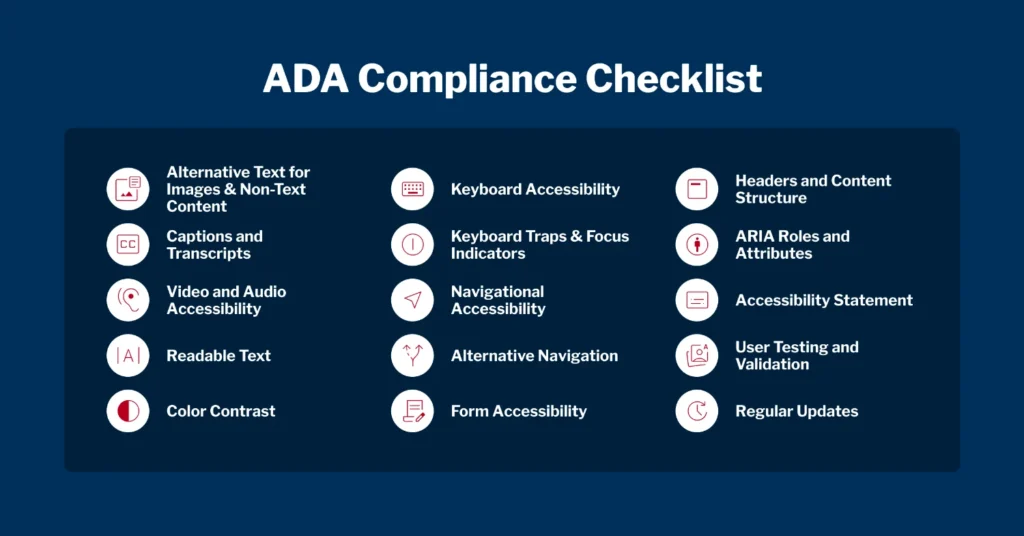
Key Components:
- Perceivable Content: Information and interface components must be presentable to users in ways they can perceive, such as providing text alternatives for non-text content.
- Operable User Interface: Navigation and user interface components must be workable via keyboard alone, avoiding “mouse-only” traps.
- Understandable Information: The text must be readable, and the interface’s operation must be predictable to prevent user confusion.
ADA compliant website design uses semantic HTML and WCAG 2.2 standards to ensure digital content is perceivable, operable, understandable, and robust for all users.
Why “Good Enough” is a Financial Risk
The US Supreme Court’s 2019 refusal to hear the Domino’s Pizza, LLC v. Robles case sent a shockwave through the global business community.
By declining the appeal, the court left in place a ruling that the ADA applies to websites and apps that connect consumers to physical locations.
This wasn’t just a loss for a pizza giant; it was a green light for a new era of digital litigation.

Since that ruling, the volume of lawsuits has stayed high. UsableNet, a digital accessibility consultancy, reported over 4,000 website-related lawsuits in 2024 alone.
These aren’t just targeting the Fortune 500. Small and medium-sized businesses (SMBs) are increasingly in the crosshairs because they lack the legal departments to fight back, often settling for five-figure sums that could have funded a complete, accessible redesign.
“The Domino’s Pizza v. Robles case fundamentally altered the risk profile of every commercial website. By establishing that digital storefronts are ‘places of public accommodation,’ the courts have made ADA compliance a non-negotiable operational requirement. Businesses failing to address core code accessibility are no longer just losing users; they are actively inviting high-probability litigation that carries significant financial and reputational penalties.”
The “Overlay” Myth: Why Your £30 Plugin is a Lawsuit Magnet
A dangerous trend has emerged where business owners install a line of JavaScript—an “accessibility overlay”—and assume they are protected.
These widgets often promise “instant AI-powered compliance” for a low monthly fee. In reality, they are often the catalyst for a lawsuit.
In 2026, we have seen a surge in “overlay-related” litigation. The problem is twofold.
First, these tools do not fix the underlying broken code; they merely attempt to “repair” it on the fly, which often fails for users who actually use assistive technology.
Second, the presence of an overlay is a public admission that the site owner knows the site has accessibility issues. It serves as a “sue me” beacon for plaintiff attorneys.
True web design services don’t rely on band-aids. They fix the source. If your buttons aren’t labelled in the HTML, an overlay might try to guess what they do, but it will never be as reliable as a properly coded <button aria-label=”Submit Form”>.
The latter is permanent; the former is a brittle hack.
Why Overlays Fail the 2026 Test
- Conflict with Assistive Tech: Many screen reader users report that overlays actually interfere with their existing software settings.
- False Security: They only catch about 30% of WCAG failures, leaving the most critical 70% (like keyboard traps) wide open.
- Performance Drag: Loading heavy third-party scripts slows down your site, negatively impacting your website speed and SEO rankings.
The Business Case: Tapping into the “Purple Pound”

In the UK, the “Purple Pound”—the spending power of disabled people and their families—is estimated at £274 billion per year.
Despite this, a staggering number of service pages and e-commerce stores remain unusable for this demographic. If your site is difficult to navigate, these users don’t struggle through it; they simply leave and spend their money with a competitor who bothered to code correctly.
Accessible design also caters to the “Silver Tsunami”—the rapidly ageing baby boomer generation.
As eyesight fades and motor skills decline, features like high contrast, large touch targets, and dark mode support become essential rather than optional.
This is the wealthiest demographic in history. Designing for them isn’t charity; it is sound fiscal strategy.
Furthermore, building a sustainable web design often goes hand in hand with accessibility.
Clean, semantic code is lighter, faster to load, and consumes less energy. When you strip away the bloat required to make “pretty but broken” layouts work, you end up with a high-performance asset that serves everyone better.
“The ‘Purple Pound’ represents a massive, underserved market that remains largely ignored by the average SMB. By prioritising ADA-compliant website design, brands can capture a share of this £274 billion spending power while simultaneously improving UX for the ageing demographic. Accessibility is the only design discipline that offers a direct correlation between social inclusivity and immediate, measurable revenue growth.”
Machine Readability: Why AI Agents Require Semantic Infrastructure
In 2026, your primary “visitor” is often an autonomous software agent. These agents do not “see” your website layout; they parse the Document Object Model (DOM).
When a website lacks a clear semantic hierarchy, these agents experience high computational friction. This results in your content being bypassed in favour of competitors whose data is structured for instant machine comprehension.
Semantic HTML vs Visual Layering
Visual layering uses CSS to position elements regardless of their place in the code.
A professional design prioritises the logical flow of information. For instance, a navigation menu should always be wrapped in a <nav> tag, and the primary content must reside within a <main> element.
Without these markers, an agent cannot distinguish between your primary value proposition and a sidebar advertisement.
ARIA Labels as Machine Metadata
Accessible Rich Internet Applications (ARIA) labels provide essential context for elements that cannot be described solely by HTML.
A “Search” button that only contains a magnifying glass icon is invisible to an agent unless it has an aria-label=”Search”.
By providing these labels, you are not just helping screen reader users; you are also providing the metadata that allows answer engines to categorise your site’s functionality accurately.
Impact on Search Performance
Data from the first quarter of 2026 indicates a direct correlation between WCAG 2.2 adherence and organic visibility. Systems that manage information retrieval now use accessibility scores as a proxy for content quality.
A site that is easy for a person with a visual impairment to navigate is, by definition, easy for a machine to index. This synergy makes inclusive design the most efficient way to improve your visibility across all digital platforms.
The Impact of Generative Search
- Agent Navigability: Autonomous agents (such as those from OpenAI or Anthropic) rely on ARIA labels to understand the functions of buttons.
- Contextual Ranking: Google’s 2026 algorithms reward “clear information architecture,” a core tenet of WCAG.
- Multilingual Support: A multilingual website that is also accessible ensures that translation AI can accurately map your content across languages without losing context.
The Cost of the “Quick Fix”
I once audited a client—a mid-sized law firm in London—who had spent £15,000 on a beautiful, “award-winning” website redesign.
Three months after launch, they received a demand letter from a US-based firm claiming their site was non-compliant. They were confused. “But it looks amazing,” they said.
The problem was that their “designer” had used a drag-and-drop builder that prioritised visual “z-index” layers over logical tab order.
When I ran a manual test using only a keyboard, I couldn’t even get past the cookie banner. The “Submit” button on their lead form was an image with no alt-text. To a screen reader, the form literally didn’t exist.
The most expensive mistake I see founders make is hiring for “pretty” and assuming “functional” is included. It rarely is.
We had to gut 40% of their CSS and rewrite their entire header structure. The cost of fixing a site after it’s built is triple the cost of doing it right the first time. In 2026, if your developer doesn’t mention “WCAG 2.2” in the first meeting, you’re hiring the wrong person.
WCAG 2.2 Technical Requirements (2026 Benchmark)

| Feature | Requirement | Technical Implementation | Impact Level |
| Focus Visible | 2-pixel thick border | :focus-visible { outline: 2px solid #0056b3; } | Critical |
| Target Size | Minimum 24×24 pixels | min-height: 24px; min-width: 24px; | High |
| Text Spacing | 0.12x font size | letter-spacing: 0.12em; | Medium |
| Dragging Movements | Pointer-only alternative | Use standard click-to-move as a fallback | High |
| Help Location | Consistent placement | Global footer or header-integrated support | Medium |
Keyboard Navigation and Focus Management
A website must be entirely operable via a keyboard. This includes the ability to “tab” through every interactive element in a logical order.
A common failure in modern design is the “keyboard trap,” where a user enters a modal or a menu and cannot exit without using a mouse.
Professional developers implement focus traps within modals to ensure the user remains within the active component until the modal is closed.
Colour Contrast and Visual Clarity
The 2026 standard for body text is a minimum contrast ratio of 4.5:1 against the background.
For large-scale text, this drops to 3:1. However, to cater to the ageing “Silver Tsunami” demographic, leading brands now aim for 7:1 (Level AAA).
High-contrast designs reduce cognitive load and visual fatigue, which improves session duration and conversion metrics for all users, including those with perfect vision.
Responsive Reflow and Zoom Support
Users must be able to zoom in up to 400% without losing functionality or seeing text overlap.
This requires a “reflow” design approach where the layout shifts to a single column as the zoom increases.
Avoiding fixed-width containers and using relative units like rem or em ensures that your interface remains robust across all device types and user preferences.
| Technical Aspect | The Wrong Way (Amateur) | The Right Way (Pro) | Why It Matters |
| Link Identification | “Click here” or “Read more” | “Read our Guide to ADA Compliance” | Context-less links are useless for screen reader “link list” views. |
| Color Contrast | Light grey text on white (#767676) | Minimum 4.5:1 ratio for body text | Low contrast makes content unreadable for users with visual impairments. |
| Images | No alt-text or “image123.jpg” | Descriptive alt-text for every image | AI and screen readers need text to understand visual assets. |
| Navigation | Mouse-hover dependent menus | Fully keyboard-operable tab order | Users with motor disabilities cannot use a mouse. |
| Forms | Placeholder text instead of labels | Explicit <label> tags for every field | Placeholders disappear as users type, confusing users. |
| Heading Structure | Using H tags for “font size” | Logical H1 -> H2 -> H3 hierarchy | Out-of-order headings break the “outline” for assistive tech. |
Global Compliance Landscapes: Navigating UK and US Standards
While the Americans with Disabilities Act (ADA) and the UK Equality Act 2010 are distinct pieces of legislation, their digital requirements have converged around the WCAG 2.2 framework.
For a UK-based business, ignoring US standards is no longer an option if you have an online presence.
US courts have frequently ruled that any business that offers services to US residents must comply with the ADA, regardless of its headquarters.
Legal Reciprocity in 2026
The legal landscape has shifted towards a “Global Baseline” of digital accessibility.
In late 2025, several high-profile cases demonstrated that UK companies could be held liable in international courts for digital barriers that prevent trade.
This means that a “reasonable adjustment” in the UK is now legally defined by the highest international standard, typically WCAG 2.0 Level A.
Risk Mitigation for Service Providers
To protect against litigation, businesses must move beyond “one-off” audits. Professional compliance requires a continuous monitoring programme.
This involves quarterly technical scans and annual manual audits conducted by accessibility specialists.
Documentation of these efforts—known as an Accessibility Statement—serves as a legal “safe harbour,” proving that the business is actively working to resolve barriers.
The Economic Advantage of Compliance
Global digital accessibility is not just a legal shield; it is a market entry strategy.
By adhering to the strictest international standards, you ensure that your website is ready for any market, from the European Union (under the European Accessibility Act) to the United States.
This reduces the cost of expansion and ensures that your brand reputation remains untarnished by claims of exclusion or discrimination.
Accessible Design for Neurodivergent and Cognitive Needs

Cognitive accessibility focuses on how people process information.
This includes users with ADHD, autism, dyslexia, or memory impairments.
In 2026, the most effective digital interfaces avoid “cognitive overload” by using consistent layouts and clear, jargon-free language. If a user has to “re-learn” your navigation on every page, you have failed the accessibility test.
Reducing Motion and Distraction
Autoplay videos and parallax scrolling can be physically disorienting for users with vestibular disorders.
A professional website respects the “prefers-reduced-motion” system setting on a user’s device.
If your design includes animation, it must have a visible “pause” or “stop” control. This ensures that the user remains in control of their sensory environment.
Predictable Interactions
Navigation should be consistent across all pages. If your “Contact Us” button is at the top right on the homepage, it should not move to the footer on a service page.
Predictability reduces anxiety and cognitive friction, making it easier for users to complete tasks. This is a core requirement of WCAG 2.2 and a significant driver of user trust and retention.
The Verdict
The myth that ADA compliance is an “extra” feature for websites must die.
In 2026, accessible design is the only way to build a resilient, future-proof brand that serves both humans and machines.
By ignoring these standards, you are not just risking a lawsuit; you are intentionally narrowing your market and hiding your content from the AI systems that now control the flow of information.
The contrarian truth is that the most “human” way to design is also the most “machine-friendly.” Clean code, clear hierarchy, and inclusive interaction patterns are the hallmarks of a professional digital presence.
Do not wait for a demand letter to land on your desk before you take this seriously.
Start by auditing your core templates. Remove the overlays. Fix the semantic HTML. Ensure your web design services partner treats accessibility as a core requirement, not a secondary “add-on.”
The future of the web is accessible, or it is nothing.
FAQs
How do I check whether my website is ADA-compliant?
You should start with automated tools like WAVE or Axe DevTools to catch low-hanging fruit, but these only identify roughly 30% of issues. A professional audit involving manual keyboard testing and screen reader walkthroughs is the only way to ensure 100% compliance with WCAG 2.2 standards.
Is ADA compliance mandatory for UK businesses?
While the ADA is a US law, the UK’s Equality Act 2010 requires service providers to make “reasonable adjustments” to ensure disabled people can access their services. If you trade in the US or have a global audience, ADA compliance is a legal necessity to avoid international litigation.
Does an accessibility overlay protect me from lawsuits?
No. In fact, overlays are often used as evidence that a site owner is aware of accessibility gaps but has failed to fix the underlying code. High-profile cases have shown that plaintiffs’ attorneys frequently target sites with overlays because they are easier to spot and often fail to fix core issues.
What is the difference between WCAG 2.1 and 2.2?
WCAG 2.2 is the latest standard, released to address mobile accessibility and cognitive disabilities more effectively. It includes new criteria for touch target size, dragging movements, and consistent help, making it the required benchmark for any site built or updated in 2026.
Will ADA compliance make my site look boring?
Accessible design does not restrict creativity; it enforces better hierarchy. High-contrast palettes, clear typography, and logical layouts often result in a cleaner, more modern aesthetic that improves the user experience for everyone. Some of the world’s most awarded designs are fully WCAG 2.0 Level A compliant.
How much does an ADA-compliant website cost?
Building accessibility into a new site from the start typically adds 10-15% to the total development cost. Retrofitting an existing, non-compliant site is significantly more expensive, as it often requires structural code changes and a complete rewrite of the CSS and navigation logic.
Can I use AI to make my website accessible?
AI can assist with writing alt text or identifying contrast errors, but it cannot “fix” a website autonomously. True accessibility requires human judgment to ensure that navigation is logical and that complex interactions—such as modals or checkout flows—are actually usable for a human using assistive technology.
What are the most common ADA accessibility errors?
The most frequent failures include low colour contrast, missing alt-text for images, empty links that have no descriptive text, and “keyboard traps” where a user cannot move their focus away from a specific element without using a mouse.
When should I perform an accessibility audit?
You should conduct an accessibility audit during the design phase, immediately after launch, and then annually. Websites are dynamic; every time you add a new plugin, blog post, or landing page, you risk introducing new accessibility barriers that could trigger a legal claim.
Is accessibility good for SEO?
Yes. Search engines like Google reward sites with clear semantic structures, fast load times, and good user experience metrics. Since ADA-compliant sites use clean HTML and logical hierarchies, they are naturally easier for search engines to index and rank.
