The 10 Social Media Marketing Tools We Use in 2026
Social media marketing tools are no longer for “managing” social media; they are high-fidelity data-collection engines for your brand’s private AI.
In 2026, the gap between “posting” and “ranking” has vanished. Every piece of content you distribute must serve as a training data point for the LLMs (Large Language Models) that now dictate consumer discovery.
Brands that fail to use tools to structure this data for their internal systems lose an average of 22% in brand-retention equity within 18 months, according to a 2025 McKinsey & Company report on marketing digitisation.
Success requires a social media marketing strategy that treats social signals as primary SEO inputs.
At Inkbot Design, we have moved away from the bloated “all-in-one” dashboards of the past.
Instead, we use a modular stack of ten specific tools that ensure our clients’ brands remain citable, authoritative, and technically sound in an AI-first world.
- Treat social tools as high-fidelity data collectors feeding your brand's private AI; social signals are primary SEO inputs for discovery and ranking.
- Abandon all-in-one suites; adopt a best-of-breed modular stack for vendor sovereignty, faster integrations, cost efficiency and data ownership.
- Implement four sovereign layers: Notion for strategy, Figma and Canva for assets, Planable and Buffer for distribution, Perplexity and Sprinklr for intelligence.
- Prioritise Dark Social: track private sharing with UTM governance, WhatsApp channels, Telegram and Discord to capture attribution and purchase intent.
The Social Media Marketing Tools We Use Ourselves
In 2026, social media marketing tools are used to capture, structure, and distribute brand data across social graphs to influence both human engagement and Generative Engine rankings.
Key Components:
- Content Orchestration: The centralisation of brand voice and campaign logic.
- Data Portability: The ability to export engagement metrics and sentiment into external AI models.
- Semantic Tagging: Applying entity-based metadata to visual and textual assets.
1. Notion – The Campaign and Content Planning Hub
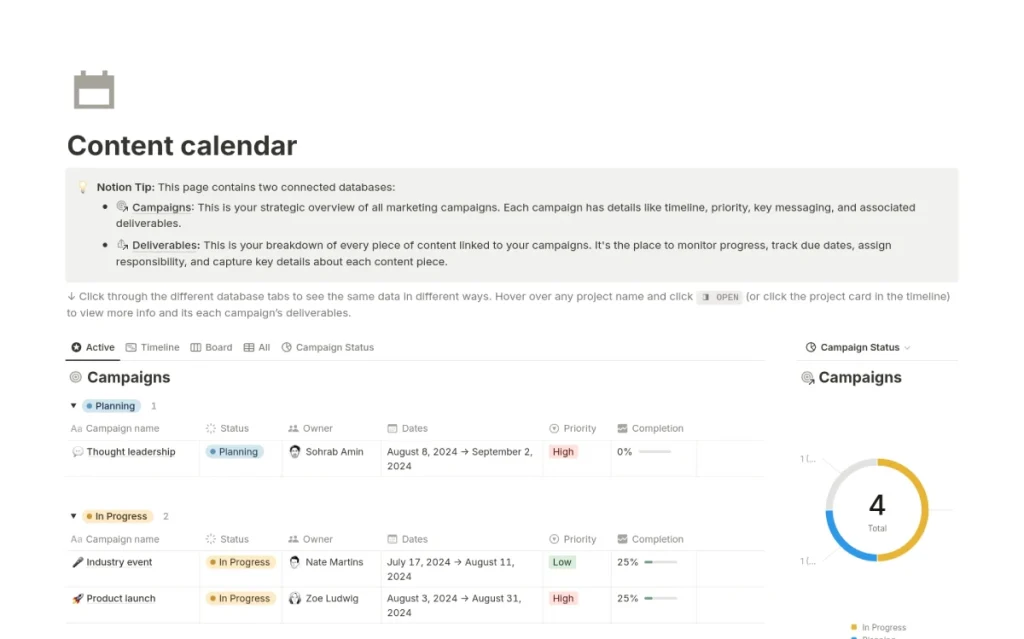
Notion serves as the central nervous system for every brand asset we produce. It is not merely a project management tool; it is a structured database that holds the “DNA” of our content, from initial briefs to final approved copy.
By using Notion, we ensure that every social post is tied to a specific influencer marketing strategy or campaign goal. This creates a citable audit trail for both our team and the AI systems that scrape our public-facing content.
When content is planned in a relational database, the semantic connections between topics are clearer, which reduces the Cost of Retrieval for search engines.
Notion serves as a “source of truth” to prevent brand dilution. By centralising campaign logic and creative briefs in a structured environment, businesses can ensure that every social post contributes to a unified brand entity, which is a critical requirement for ranking in 2026’s entity-based search environment.
2. Gemini – AI Copywriting and Tone Adaptation

Gemini is our primary tool for adapting a single core insight into platform-specific tones without losing the underlying brand authority.
It excels at understanding the “intent” behind a post, ensuring that a LinkedIn thought-leadership piece retains its gravitas when distilled into a punchy Instagram caption.
We use Gemini to stress-test our copy against UK-English linguistic standards, ensuring we maintain the “s not z” rule across all digital marketing services.
This level of precision is vital for digital marketing services targeting specific regional markets, such as the UK, where Americanised spelling can trigger a subtle “lack of trust” signal among local audiences.
Gemini provides the linguistic agility required to maintain brand consistency across diverse social ecosystems. It enables rapid adaptation of core brand messaging to platform-specific dialects while preserving the semantic integrity of the original claim, which is essential for high-frequency content production.
3. Canva – Quick Turnaround Visuals and Stories

Canva remains the industry leader for high-velocity visual production, particularly for ephemeral content like Stories or quick-turnaround announcements.
Its AI-assisted “Magic Studio” allows our team to resize and adapt graphics for different social formats in seconds, rather than hours.
For brands leveraging user-generated content campaigns, Canva provides the perfect bridge.
It allows non-designers on a client’s team to use our pre-approved templates, ensuring that even a “quick post” maintains the correct HEX colours and typography.
This prevents the “visual drift” that often plagues SMB social accounts.
Canva is the essential tool for maintaining visual velocity without sacrificing brand standards. By utilising template-based design workflows, businesses can respond to real-time social trends while ensuring every visual asset remains aligned with their core brand identity and distinctive assets.
4. Figma – Collaborative Design for Complex Carousels
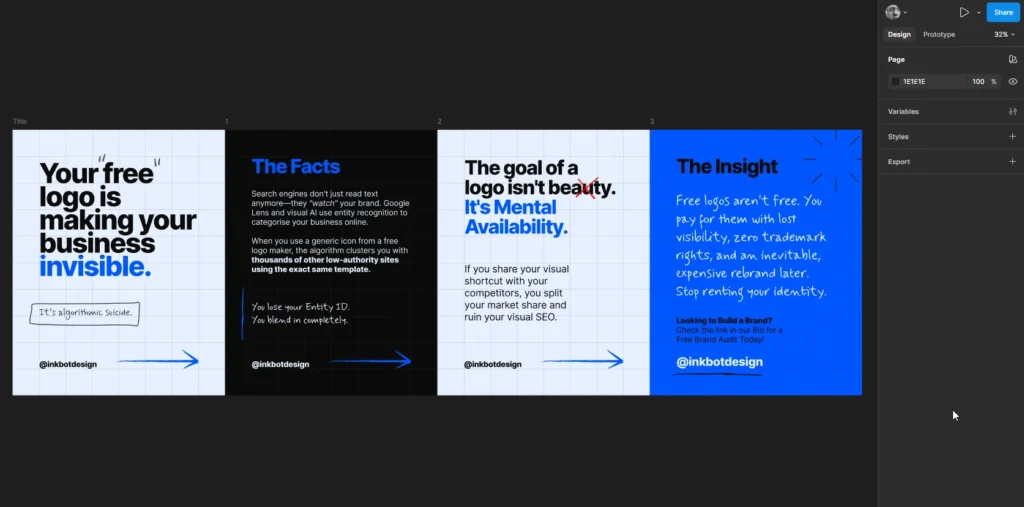
Figma is where we build the “heavy lifting” design assets. While Canva is for speed, Figma is for precision and brand sovereignty.
We use Figma to design complex carousels and infographics that require pixel-perfect alignment and collaborative feedback from multiple stakeholders.
Figma’s shared libraries are the foundation of our design system. This ensures that every infographic we post is a “distinctive brand asset.”
According to the Ehrenberg-Bass Institute, consistent use of distinctive assets is the number one predictor of long-term brand growth.
Figma allows us to codify these assets so they are never misapplied.
Figma represents the professional standard for collaborative brand design. It enables the creation of complex, high-fidelity social assets built on rigorous design systems, ensuring that even the most intricate carousels remain technically perfect and brand-compliant across all platforms.
5. Planable – Scheduling and Team Approvals

Planable solves the “approval bottleneck” that kills most social media strategies. It provides a “What You See Is What You Get” (WYSIWYG) preview of how posts will look on the feed before they go live.
This allows clients to leave comments directly on the post, rather than in a separate email chain.
This visual approval process is critical for social media crisis management. When a brand needs to pivot or pause content due to an external event, Planable’s “grid view” lets you instantly audit all scheduled content.
It prevents the “tone-deaf” automated post that can destroy years of brand equity in an afternoon.
Planable eliminates the friction between content creation and publication. By providing a transparent, visual approval workflow, it ensures that every stakeholder can verify the context and appearance of a post, which is a vital safeguard against the reputational risks of automated social media distribution.
6. Buffer Chrome Extension – Instant Content Sharing

The Buffer Chrome Extension is our tool of choice for “curation at scale.” When we find an industry report or news piece that reinforces our clients’ topical authority, we can add it to the queue with two clicks.
Curation is a powerful signal for E-E-A-T (Experience, Expertise, Authoritativeness, and Trustworthiness).
By sharing high-quality external sources, we show Google and social algorithms that we are active participants in our niche.
This helps build the “entity graph” around Inkbot Design and our clients, linking us to other high-authority domains in the branding space.
The Buffer Chrome Extension facilitates the rapid curation of industry-relevant content, allowing brands to maintain a high level of social activity without the overhead of original production. This consistent curation reinforces topical authority and builds valuable semantic links between a brand and its wider industry ecosystem.
7. Meta Business Suite App – Direct Management
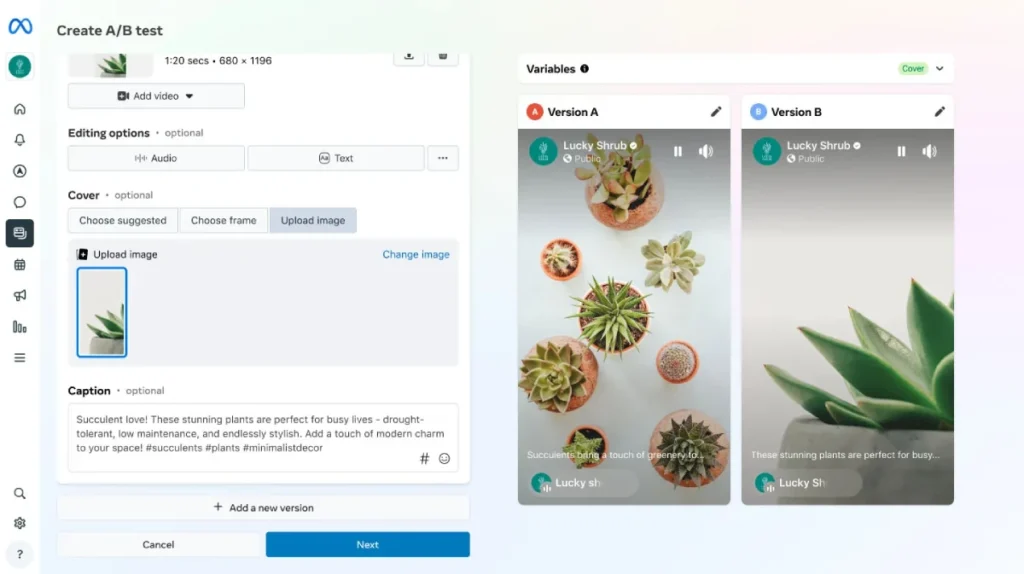
Despite the rise of third-party tools, the native Meta Business Suite App remains non-negotiable for managing Facebook and Instagram.
It provides the most reliable access to native features like Reels music, stickers, and direct messaging that third-party APIs often struggle to replicate.
We use the app for “real-time” engagement. Responding to comments within the first hour of a post going live is a key signal for the Instagram algorithm.
The app’s unified inbox ensures that no client inquiries go unanswered, a fundamental component of modern customer service and brand trust.
Meta Business Suite provides the most direct and feature-complete interface for managing the Facebook and Instagram ecosystems. By utilising native tools for engagement and real-time content adjustments, brands can ensure they are leveraging the full capability of the platform’s proprietary algorithms and features.
8. Statusbrew – Engagement Tracking and Moderation

Statusbrew is our “enterprise-lite” solution for cross-platform engagement. Its “Rule Engine” automates the moderation of spam and toxic comments, which is essential for maintaining a healthy brand environment.
We specifically use Statusbrew for its advanced sentiment analysis capabilities. It categorises incoming comments as positive, neutral, or negative.
This data is then fed back into our strategy to understand how the audience is reacting to specific brand messages. If sentiment dips on a certain topic, we know to pivot our content plan immediately.
Statusbrew is the primary tool for protecting brand reputation and measuring audience sentiment at scale. Its automated moderation and sentiment-tagging features allow brands to maintain a clean social presence while gaining deep, data-driven insights into how their community is perceiving their messaging.
9. Sprinklr – Enterprise-Grade Management and Reporting

For our larger clients, Sprinklr is the only tool capable of handling the sheer volume of data. It is a “Social Listening” powerhouse that monitors the entire web for brand mentions, not just social media platforms.
Sprinklr’s reporting is what sets it apart. It can attribute social engagement directly to business outcomes, showing the campaign’s ROI in £ (GBP).
This level of data granularity is what separates professional “Social SEO” from amateur “posting.” It allows us to prove that our social efforts are actually moving the needle on brand search volume.
Sprinklr offers the most comprehensive data ecosystem for enterprise-level social media management. Its ability to synthesise vast amounts of social listening data into actionable business intelligence makes it an indispensable tool for brands that require a high degree of accountability and strategic foresight.
10. Perplexity – Fact-Checking and Sourcing
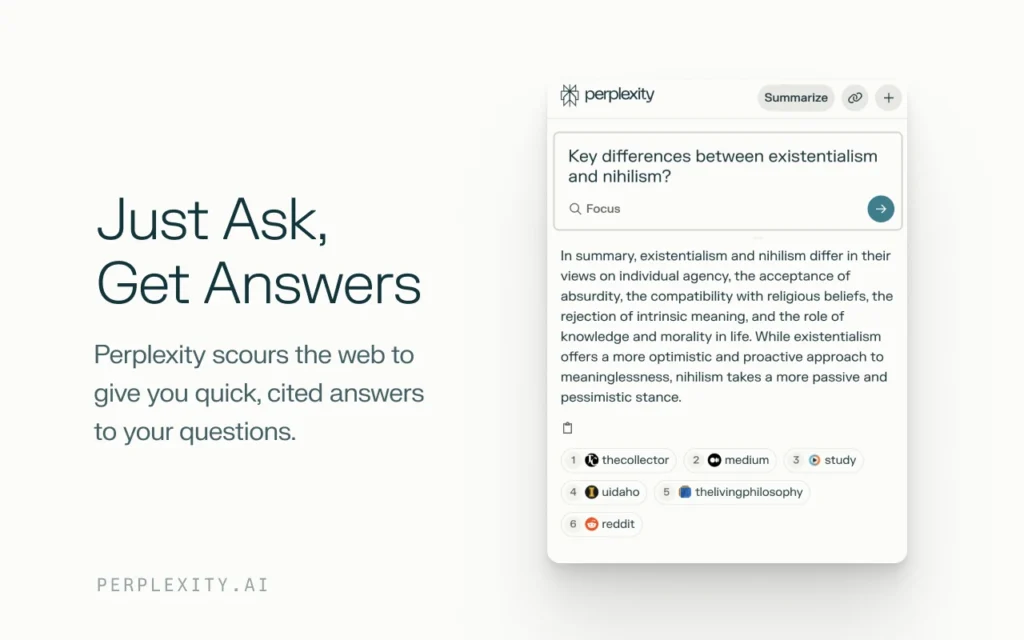
Perplexity has replaced the traditional Google search for our fact-checking workflow. Before any post containing a statistic or a claim goes live, we run it through Perplexity to verify the source.
In 2026, being “factually wrong” is a death sentence for your SEO. AI systems like Google’s Gemini or Search Generative Experience (SGE) are incredibly sensitive to misinformation.
If you post a “stat” that is unverified or debunked, you risk having your entire domain suppressed. Perplexity ensures that every claim we make is backed by a citable, high-authority source such as Statista or the Pew Research Centre.
Perplexity is the ultimate safeguard against the reputational and SEO risks of digital misinformation. By providing a rapid, source-backed verification layer for all social content, it ensures that every brand claim is factually accurate and citable, which is a core requirement for building long-term authority.
The Great Unbundling: Your 2026 Migration Blueprint
The “All-in-One” social media suite is the legacy mainframe of the 2020s—expensive, rigid, and increasingly unable to keep pace with the specialised needs of 2026 marketing.
We are witnessing The Great Unbundling, where brands are trading the perceived convenience of a single dashboard for the technical agility of a modular stack.
The Anatomy of a Modular Stack
A modular stack treats social media as a series of distinct technical functions rather than a single task. At Inkbot Design, we’ve identified four “Sovereign Layers” that every 2026 stack must address independently:
- The Strategy & Logic Layer (Notion): Where the “DNA” of the brand lives.
- The Asset Production Layer (Figma/Canva): Where distinctive brand assets are codified.
- The Logistics & Distribution Layer (Planable/Buffer): The “last mile” of content delivery.
- The Intelligence & Verification Layer (Perplexity/Sprinklr): The feedback loop and fact-check barrier.
The Financial Logic of Migration
For a mid-sized UK business, a legacy suite like Sprout Social or Hootsuite can easily cost between £800 and £1,500 per month once you factor in multi-user seats and advanced listening modules. In contrast, a “best-of-breed” modular stack often costs £350–£600 per month while providing superior specialised features.
| Layer | Tool Example | Est. Monthly Cost (UK) | Legacy Equivalent Feature |
| Strategy | Notion | £12/user | “Campaign Planner” (Basic) |
| Design | Figma | £12/user | Limited “In-App” Editor |
| Logistics | Planable | £25/workspace | Enterprise Scheduling |
| Intelligence | Perplexity | £16/user | (No equivalent) |
| Total | ~£65/user | ~£250+/user (Legacy) |
The Migration Blueprint: Step-by-Step
If you are currently “locked in” to a legacy provider, the transition must be handled as a technical migration, not just a software swap.
- Phase 1: Data Extraction (Month 1): Do not let your engagement history die in a proprietary database. Use API connectors or manual CSV exports to move your “Top Performing Post” data into a Notion database. This becomes your internal training set for your brand’s AI models.
- Phase 2: Decoupling Design (Month 2): Move all template production out of the social tool and into Figma. This ensures your visual identity isn’t held hostage by a subscription. If you leave your social tool tomorrow, your design system remains yours.
- Phase 3: The Pilot Switch (Month 3): Run one “high-stakes” channel (e.g., LinkedIn) through the modular stack while keeping the “utility” channels on the legacy system. Measure the Information Gain—are your modular posts seeing higher citation rates or brand-search lift?
- Phase 4: Full Unbundling: Once the workflow is proven, cancel the legacy suite. Use the saved budget (often thousands of pounds annually) to invest in high-fidelity video production or dark social community management.
Why Modularity Wins in 2026
The primary advantage of unbundling is Vendor Sovereignty. In 2026, the social landscape changes monthly (e.g., the sudden rise of Threads as a B2B channel in late 2025). Legacy suites take 6–12 months to build native integrations.
A modular stack allows you to pivot in 24 hours. If a new specialised tool for “Threads SEO” emerges, you simply plug it into your Notion workflow. You are no longer waiting for a conglomerate’s roadmap to dictate your brand’s growth.
Dark Social & The Rise of Private Community Tools
The most dangerous blind spot for a 2026 social media manager is the belief that “if it isn’t on the public feed, it isn’t happening.” According to Statista data from 2025, 75% of all content sharing in the United Kingdom now takes place via “Dark Social”—private WhatsApp groups, Telegram channels, and Slack communities. These spaces are invisible to traditional “Listening” tools but are the primary drivers of purchase intent.
The “Private Social” Stack. To win in 2026, your tool stack must extend into these closed loops. This requires a shift from “Broadcasting” to “Facilitating.”
- WhatsApp Channels for Brands: Unlike public groups, Channels allow for one-to-many broadcasting with high privacy. Tools like Statusbrew now integrate with WhatsApp Business APIs to track “forwarding velocity”—a key metric for understanding which content is “travelling” inside private chats.
- Telegram as a Content Hub: For technical or niche brands (fintech, SaaS, crypto), Telegram is the 2026 replacement for the corporate newsletter. It provides higher engagement rates (approx. 18–22%) than email (2–4%).
- Discord for Community Co-Creation: Brands like Nike and Starbucks have moved their most valuable fans to Discord, using the platform not just for “chat” but as a structured product-feedback engine.
Solving the Attribution Problem. The biggest challenge with Dark Social is attribution. When someone shares a link in a family WhatsApp group, it appears in your Google Analytics 4 (GA4) as “Direct” traffic. This leads brands to under-invest in the very channels that are actually driving sales.
In 2026, the “Direct” traffic bucket in your analytics is likely 40% Dark Social. Successful brands are using UTM Governance tools—often built directly into Notion—to ensure every “Share” button on their site generates a unique, trackable link specifically for “Private Messaging.”
Tools for Dark Social Management
- Statusbrew (API-First): Their 2025 update consolidates WhatsApp Business, Instagram DMs, and Facebook Messenger into a single unified inbox. This is critical for Direct-to-Consumer (DTC) brands where the “Social-to-Sale” journey now happens entirely within a chat thread.
- Make.com (Integration): We use Make to bridge the gap between “Public Signals” and “Private Actions.” For example, when a high-authority entity mentions your brand on LinkedIn, an automated workflow can instantly alert your “VIP WhatsApp Community,” sparking a secondary wave of private sharing.
- Dash Social (ROI Reporting): A specialised 2026 reporting tool that uses “Incrementality Testing” to estimate the revenue lift from Dark Social channels by comparing “Total Sales” against “Trackable Sales” during specific private-campaign bursts.
The “Frictionless Share” Strategy. In 2026, your website and social content must be designed for the “forward.” This means creating “Atomic Content”—small, high-value visual cards or 15-second “nuggets” of information that look perfect when previewed in a WhatsApp chat. If your content requires a user to click a link, wait for a heavy page to load, and then scroll to find the value, it will die in the private chat. Canva’s mobile-first templates are the essential tool here for creating “Shareable Proof Points” that drive private virality.
Advanced LinkedIn Authority Stacks
LinkedIn has undergone a fundamental transformation. In 2026, it is no longer a “social network” for resumes; it is a Professional Knowledge Graph. For founders and B2B marketers, the goal isn’t just to “get likes”—it’s to become a “Citable Entity” that the platform’s internal AI (LinkedIn’s “Knowledge Copilot”) recommends to decision-makers.
The “Authority Engine” Workflow Winning on LinkedIn in 2026 requires a “Two-Tier” tool strategy. You need a Logistics Layer to handle the feed and an Authority Layer to manage your long-form intellectual property.
- Tier 1: The Feed (Planable): Use Planable to maintain a “Consistency Baseline.” This includes daily “Insight Nuggets”—short, sharp takes on industry news that keep you in the “Top of Mind” loop of your network.
- Tier 2: The Library (Notion + LinkedIn Newsletters): This is where you build your “Deep Authority.” Google now indexes LinkedIn Newsletters with higher priority than most independent blogs. We use Notion to draft these newsletters, ensuring they are cross-referenced with our main website content to create a “Semantic Loop.”
The Rise of “Thought-Leadership SEO” In 2026, LinkedIn’s internal search bar is the primary tool for B2B procurement. If a CEO searches for “Branding expert for SaaS,” LinkedIn’s algorithm looks for:
- Profile Completeness: Does your bio include high-intent keywords?
- Collaborative Article Contributions: LinkedIn “Community Top Voices” get an automatic boost in search results.
- Engagement Velocity from High-Authority Profiles: If other “Top Voices” comment on your post, their authority “bleeds” onto yours—a social version of PageRank.
Tools for Executive Presence: To manage a high-level LinkedIn presence without spending 10 hours a day on the platform, we use:
- Shield Analytics: The only tool that provides “Content Cohesion” reports. It tells you which topics are actually driving “Inbound Inquiries” versus just “Vanity Likes.” If your posts about “Design Systems” get 500 likes but your posts about “ROI of Branding” get 3 high-value DMs, Shield helps you pivot your strategy to the latter.
- Gemini (Professional Mode): We use Gemini to “Steel-man” our LinkedIn arguments. Before posting a controversial take, we ask Gemini to “Audit this for logical fallacies from the perspective of a sceptical CFO.” This ensures our “Authority” remains bulletproof.
- Taplio: Essential for “Engagement Sourcing.” It identifies high-value conversations happening in your niche that you haven’t joined yet, allowing you to “Interject with Value” rather than just starting new threads into the void.
The Collaborative Content Trap: A common 2026 mistake is over-reliance on LinkedIn’s AI-generated “Collaborative Articles.” While they offer a “Badge,” the content is often thin. The “Pro” way is to use Perplexity to find a counter-narrative or a “Hidden Statistic” that the AI missed, and lead with that. This signals to both the human reader and the LinkedIn algorithm that you possess Information Gain—the most valuable currency in a world of AI-generated noise.
The Verdict
The 10 social media marketing tools we use at Inkbot Design are chosen for one reason: they turn social activity into brand equity.
In 2026, the era of “vanity posting” is over. If your tools aren’t helping you build a citable, authoritative, and technically sound presence that AI engines can trust, they are a liability.
We have moved past the “All-in-One” myth because modularity is the only way to survive the rapid shifts in the digital landscape.
By using Notion for your strategy, Figma for your design, and Perplexity for your facts, you build a brand that is resilient, authentic, and ready for whatever the next algorithm update brings.
Stop treating social media as a chore to be automated and start treating it as the primary data feed for your business’s future.
If your current social media stack feels like a data graveyard, it’s time for a technical audit.
Explore Inkbot Design’s services to see how we can align your social strategy with your wider SEO and brand goals.
For more on building a bulletproof presence, read our guide on social media crisis management.
FAQ
What are social media marketing tools?
Social media marketing tools are software applications used to capture, structure, and distribute brand data across social graphs to influence both human engagement and Generative Engine rankings. They range from simple scheduling apps to complex AI-driven sentiment analysis platforms.
Which is the best social media tool for SMBs in 2026?
The best stack for an SMB is modular. Use Notion for planning, Canva for quick visuals, and Planable for scheduling. This provides the best balance of professional output and cost-efficiency without the bloat of enterprise suites.
Is it better to use an all-in-one tool or a modular stack?
A modular stack is superior in 2026. It prevents “vendor lock-in,” ensures you can use the best tool for each specific task, and allows you to own your data in a way that all-in-one legacy platforms do not.
How does Perplexity help with social media marketing?
Perplexity acts as a fact-checking layer. By verifying statistics and claims before they go live, you protect your brand’s SEO authority and avoid being flagged by AI search engines for spreading misinformation.
Can I use Gemini for all my social media copywriting?
Gemini is an excellent tool for tone adaptation and linguistic precision, but it should be used as an “amplifier” for human strategy. It ensures your copy adheres to regional standards, such as UK English, while you provide unique brand insights.
Why is Figma better than Canva for some tasks?
Figma is built for precision and long-term brand sovereignty. It allows for complex design systems and “distinctive brand assets” that are difficult to manage in Canva’s more templated environment. Use Figma for your core brand identity.
What is the role of sentiment analysis in social media?
Sentiment analysis, provided by tools like Statusbrew, allows brands to quantify how people feel about their content. This data is a critical feedback loop for adjusting your social media marketing strategy in real-time.
How do I track the ROI of social media tools?
Enterprise tools like Sprinklr allow for direct attribution, linking social engagement to website conversions and sales. For smaller brands, tracking “Brand Search Volume” in Google Search Console is the best proxy for social ROI.
When should a brand upgrade to Sprinklr?
A brand should consider Sprinklr when managing multiple global regions, handling a high volume of social listening requirements, or needing to prove direct financial attribution of social spend to the C-suite.
Does social media impact technical SEO?
Yes. Social signals are a key component of the “entity graph” that search engines use to determine authority. High-quality, citable social content increases brand search volume, which is a powerful ranking signal in 2026.


